30 Bold Lightning Photoshop Brushes for Impact
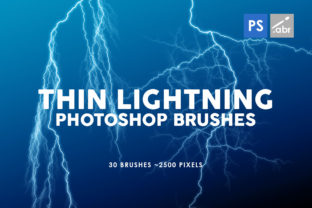
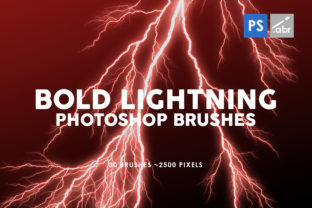
Imagine you have a photo that looks good, but it lacks energy. The lighting is flat, the mood is neutral, and nothing really grabs the viewer's attention. This is where digital assets like the 30 Bold Lightning Photoshop Brushes come into play. Instead of spending hours trying to paint realistic electricity from scratch or searching through endless stock photo sites for the perfect overlay, you can instantly add dramatic flair to your work with a single click. These tools are designed to bridge the gap between a standard image and a stunning visual statement, offering a collection of 30 unique brush textures that are ready to use right out of the box.
At their core, these brushes are high-resolution digital stamps that mimic the chaotic and beautiful nature of lightning. What makes this specific set stand out is the sheer scale and quality of the strokes. Each of the 30 brushes inside is crafted to be substantial, with sizes reaching up to 2500 pixels. In the world of digital art, resolution is everything. If you try to stretch a small lightning effect over a large canvas, it becomes pixelated and blurry, ruining the illusion. With these large-scale textures, you can apply them to high-definition posters, website banners, or print materials without losing any crispness or detail. Furthermore, they are built to be universally compatible, meaning they work with any Photoshop version. Whether you are running the latest Creative Cloud subscription or holding onto an older, stable version of the software, these tools will integrate seamlessly into your workflow.
Why High-Resolution Matters for Visual Effects
When working on digital photo manipulation or creating artwork for games, the difference between an amateur and a professional result often comes down to resolution. Many free brush sets available online are low-quality, intended only for small web graphics. When you attempt to use them on a larger project, the edges break apart. The 30 Bold Lightning Photoshop Brushes solve this problem by providing textures that are robust enough for serious work. Because they go up to 2500 pixels, you have the flexibility to scale them down for subtle sparks or keep them large for massive thunderbolts that dominate the composition.
This level of detail allows for greater creative control. You aren't just slapping a generic effect onto your image; you are adding a texture that holds up under scrutiny. For entrepreneurs and marketers creating social media ads, this means your visuals will look sharp on both mobile screens and desktop monitors. For educators creating engaging presentation slides, it ensures that diagrams or illustrative examples remain clear even when projected on a large screen. The high resolution ensures that the "bold" promise in the name is kept, delivering impact without compromising on quality.
Versatile Applications Across Different Fields
The beauty of this brush set lies in its versatility. While the immediate thought might be to create stormy weather scenes, the applications extend far beyond simple meteorology. Here is how different users can leverage these tools:
- Digital Photo Manipulation: Photographers can use these brushes to enhance portraits. A subtle arc of electricity near a subject's hand can suggest power or magic, transforming a standard headshot into a conceptual piece of art.
- Game Art and Concept Design: Game developers often need quick ways to visualize spell effects or environmental hazards. These brushes serve as excellent base layers for creating lightning spells, electric traps, or sci-fi energy weapons.
- Marketing and Advertising: Small business owners and bloggers can use these elements to create eye-catching sale banners. A bolt of lightning next to a "Flash Sale" text adds urgency and visual interest that draws the eye immediately.
- Decorative Elements: Graphic designers can incorporate these textures into backgrounds for music albums, event flyers, or YouTube thumbnails to give them a modern, edgy aesthetic.
For beginners, the learning curve is minimal. Since these are standard Photoshop brushes, you simply select the tool, choose the desired lightning shape from the list, and click on your canvas. You can then use blending modes like "Screen" or "Linear Dodge (Add)" to make the black background of the brush disappear, leaving only the glowing light. This technique allows the lightning to interact naturally with the colors and lighting of your underlying photograph, making the effect look like it was actually there when the photo was taken.
Enhancing Creativity Without Technical Barriers
One of the biggest hurdles for hobbyists and casual creators is the technical complexity of creating realistic effects. Painting light requires an understanding of luminosity, glow, and atmospheric perspective. The 30 Bold Lightning Photoshop Brushes remove this barrier. They provide pre-rendered, complex shapes that would take a skilled artist considerable time to paint manually. This allows you to focus on the composition and storytelling of your image rather than getting bogged down in the mechanics of drawing every fork and spark.
Consider a freelancer working on a tight deadline for a client who needs a poster for a music festival. Time is money. Instead of spending three hours crafting a lightning effect, the freelancer can spend three minutes selecting the perfect brush from this set, adjusting the color to match the brand palette, and moving on to the typography. This efficiency does not mean sacrificing quality; thanks to the high-resolution nature of the files, the final output remains professional grade. It empowers creators to produce more work in less time, a crucial advantage in today's fast-paced digital economy.
Important Considerations Before You Start
While these brushes are powerful, getting the best results requires a bit of know-how. First, remember that context is key. Lightning is bright and intense. If you place a stark white bolt over a dark image without adjusting the opacity or color, it might look pasted on. Take a moment to sample colors from your image and apply them to the brush, or use layer styles to add a soft outer glow that matches the ambient light of your scene.
Secondly, think about the physics of light. Lightning illuminates everything around it. When you add one of these bold strokes, consider adding a slight brightness adjustment to the areas of the photo nearest to the bolt. This small step sells the realism and makes the effect feel integrated rather than superficial. Also, since there are 30 brushes inside the pack, take the time to browse through them. Some may be thin and jagged, suitable for distant strikes, while others might be thick and bold, perfect for close-up energy discharges. Choosing the right shape for the right distance in your perspective is vital for maintaining depth in your artwork.
Finally, don't limit yourself to the default settings. Photoshop allows you to rotate, flip, and distort brushes. You can combine multiple strokes from the set to create a custom lightning network that has never been seen before. The fact that they work with any Photoshop version means you can utilize advanced features like pressure sensitivity if you have a graphics tablet, allowing you to vary the size and opacity of the stroke as you paint for even more organic results.
In summary, whether you are a seasoned graphic designer looking to expand your toolkit or a beginner eager to make your photos pop, this collection offers immense value. The combination of high resolution, universal compatibility, and varied designs makes the 30 Bold Lightning Photoshop Brushes a practical and inspiring addition to any creative project. They turn the complex task of rendering electricity into a simple, enjoyable part of your design process, opening up new possibilities for visual storytelling across all mediums.