Evaluating the Creative Potential of Splash - PS Brushes
In the fast-paced world of digital design, efficiency often dictates the quality of output. Whether you are a freelance graphic designer managing tight deadlines for a marketing agency, a small business owner creating your own promotional materials, or an educator developing engaging visual aids, the tools you choose directly impact your workflow. Among the vast array of assets available to Photoshop users, brush sets occupy a unique niche. They are not merely decorative elements; they are functional tools that can alter the texture, mood, and professionalism of a project. The Splash - PS Brushes collection represents one such resource, offering a specific set of capabilities designed to enhance projects ranging from event invitations to complex packaging designs.
This evaluation looks beyond the surface-level description of the product to understand its practical application in real-world scenarios. With a focus on usability, versatility, and the tangible value it brings to a creative toolkit, we will explore how this specific asset fits into the workflows of modern creators.
Core Functionality and Asset Composition
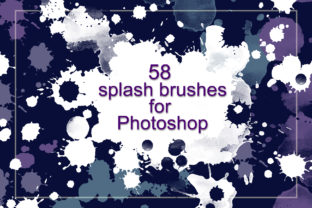
At its foundation, this product is an ABR file containing 58 distinct stamp brushes. For those unfamiliar with the technical specifics, an ABR file is the native format for Adobe Photoshop brushes, ensuring seamless integration without the need for third-party plugins or converters. The term "stamp" indicates that these brushes apply a predefined shape or texture with a single click, rather than drawing a continuous stroke like a traditional paintbrush. This distinction is crucial for users looking to speed up their decoration process.
The collection is marketed under the theme of "Splash," suggesting a focus on fluid, organic, and dynamic shapes. In practice, this translates to elements that mimic paint splatters, ink drops, watercolor bleeds, and other spontaneous artistic marks. The inclusion of 58 variations provides a significant degree of diversity. Instead of relying on a single generic splatter shape that can make a design look repetitive, a user has access to a broad library of forms. This variety allows for the creation of complex compositions where no two elements look exactly alike, maintaining a sense of organic randomness that is difficult to achieve manually.
Adaptability Through Color and Transparency
One of the most critical features of any high-quality brush set is its flexibility regarding color and opacity. Static images often fail in professional settings because they cannot adapt to a client's brand guidelines or a specific project's color palette. The Splash - PS Brushes address this by allowing full manipulation of color and transparency.
When applied in Photoshop, these brushes inherit the foreground color selected by the user. This means a single brush stroke can instantly shift from a vibrant cyan suitable for a tech startup flyer to a deep burgundy appropriate for a wedding invitation, simply by changing the color swatch. Furthermore, the ability to adjust transparency (opacity) and flow within the software adds another layer of control. By lowering the opacity, designers can create subtle background textures that do not overpower text. Conversely, stacking multiple strokes at varying opacities can build depth and intensity, simulating the look of layered physical media. This level of control ensures that the brushes serve the design rather than dictating it.
Practical Applications in Professional Workflows
The utility of these brushes extends across numerous industries and project types. Understanding where they fit best helps potential users determine if this investment aligns with their current needs.
- Event Stationery: For designers creating cards and invitations, these splash elements can add a touch of elegance or playfulness. A watercolor-style splash behind a monogram can soften a formal invite, while a bold ink splatter can energize a birthday party announcement.
- Marketing Collateral: Posters and flyers often require eye-catching backgrounds to stop the scroll in digital environments or grab attention on physical bulletin boards. These brushes provide quick ways to break up solid color blocks and add visual interest without needing to source stock photography.
- Packaging Design: In the realm of product packaging, texture is key. Using these stamps to create unique patterns or accent corners on a box label can give a product a hand-crafted, artisanal feel that resonates with consumers looking for authenticity.
- Cover Decoration: Whether for eBooks, reports, or magazine covers, the ability to quickly decorate surfaces with unique imagery saves hours of manual illustration work.
For entrepreneurs and marketers who may not have extensive graphic design training, these tools lower the barrier to entry. They allow non-designers to produce materials that look professionally curated, provided they are used with a sense of restraint and composition.
Quality and Usability Assessment
From a usability standpoint, the primary strength of this collection lies in its "unique" nature. As noted in the product description, each brush possesses its own character. In many lower-quality brush packs, users often find that the shapes are too similar, leading to a patterned, artificial look when repeated. The variation found here suggests a higher attention to detail in the creation process, likely involving actual physical media scans or sophisticated digital painting techniques.
The workflow integration is straightforward. Once the ABR file is loaded into Photoshop, the brushes appear in the Brush Tool panel. There is no complex setup required. This immediacy is valuable for professionals working under time pressure. The consistency of the edges and the resolution of the stamps appear sufficient for both web and print applications, assuming standard high-resolution document settings are used. However, as with any raster-based tool, the effectiveness relies on the resolution of the canvas being worked on. For large-format printing, such as billboards or large posters, users should ensure their document DPI is set appropriately to maintain crisp edges on the splash details.
Strategic Value for Different User Groups
Who benefits most from Splash - PS Brushes? The answer depends largely on the volume of visual content produced and the desired aesthetic.
Freelancers and Agencies: For those billing by the hour, speed is currency. Having a reliable set of 58 go-to textures can cut down decoration time significantly. Instead of searching for free PNGs online—which often come with licensing risks or inconsistent quality—a licensed brush set offers a safe, consistent, and immediate solution.
Blogger and Content Creators: In the digital content space, branding is everything. Consistently using a specific style of splash element can become part of a creator's visual identity. These brushes allow for the creation of custom headers, social media graphics, and blog post illustrations that stand out from the generic templates used by competitors.
Educators and Publishers: When creating educational materials, engagement is paramount. Adding colorful, dynamic elements to worksheets, presentation slides, or book covers can make the content more approachable and visually stimulating for students and readers alike.
Limitations and Considerations
While the Splash - PS Brushes offer substantial value, it is important to maintain realistic expectations. These are stamp brushes, not generative AI tools. They require a human eye for composition. Placing them randomly without regard for balance, negative space, or color theory can result in a cluttered and amateurish design. The tool provides the ingredients, but the user must still cook the meal.
Additionally, these brushes are specific to Adobe Photoshop. Users relying exclusively on vector-based software like Adobe Illustrator or alternative raster programs like Procreate (without conversion) may face compatibility hurdles, although ABR files are widely supported across the Adobe ecosystem. Finally, while the ability to change color is a major plus, the underlying texture of the splash is fixed. If a project requires a specific paper grain or a highly customized distortion that differs from the original stamp, additional masking or blending mode adjustments may be necessary.
Final Verdict on Long-Term Utility
In the context of a long-term creative toolkit, the Splash - PS Brushes collection stands out as a practical, high-utility asset. It bridges the gap between the need for speed and the desire for unique, hand-crafted aesthetics. The inclusion of 58 varied options ensures that the set does not become stale after a few uses; there is enough diversity to keep designs feeling fresh across multiple projects.
For professionals and serious hobbyists alike, the value proposition is clear. It eliminates the time spent hunting for free resources and mitigates the risk of using low-quality or improperly licensed images. By integrating these brushes into your workflow, you gain the ability to experiment rapidly, testing different layouts and color schemes with minimal effort. Whether you are decorating a simple flyer or constructing a complex package design, the flexibility to adjust transparency and color ensures that these tools can adapt to evolving project requirements.
Ultimately, the success of these brushes depends on the creativity of the user. They are designed to be a catalyst for new ideas, encouraging experimentation with layers, blending modes, and compositions. For anyone looking to elevate the visual quality of their cards, invitations, posters, or digital content while streamlining their production process, this set offers a reliable and effective solution. It is a testament to how the right digital assets can empower creators to realize their ideas with greater precision and artistic flair.