22 Vector Rope Brushes for Illustrator
There is a distinct charm to hand-drawn textures that digital perfection often struggles to replicate. When you are working on a project that requires a touch of the organic, the imperfect, or the vintage, standard vector lines can feel too sterile. This is where a specialized collection like the 22 Vector Rope Brushes becomes an invaluable asset for Adobe Illustrator users. This set is not just a bundle of lines; it is a toolkit designed to bridge the gap between traditional ink-on-paper aesthetics and modern vector scalability.
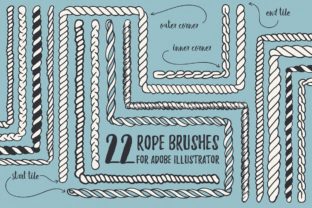
The collection is thoughtfully divided into two distinct categories to maximize versatility. First, there are 10 hand-drawn rope brushes with a solid fill. These are robust and textured, ideal for creating substantial visual elements like nautical knots, complex loops, and thick binding ropes. Because they have a solid fill, they carry weight in a design, making them perfect for logos or central illustrations where the rope itself is the subject. Second, the set includes 12 outline brushes. These are lighter, more delicate, and incredibly flexible. They excel when used for decorative frames, borders, or subtle dividers. A key advantage of these outline brushes is their adaptability; changing their color is as simple as adjusting the stroke color in your palette, allowing for instant experimentation with different color schemes without altering the brush file itself.
Why the Hand-Drawn Aesthetic Matters
What sets this specific pack apart is its origin story. Every brush was originally drawn using an ink pen on physical paper before being digitized. This process preserves the rough edges, the slight variations in line width, and the natural "wobble" that occurs when a human hand guides a pen. In a world saturated with geometric precision, these imperfections provide a sense of authenticity and warmth. For designers aiming for a vintage maritime style, a rustic outdoor theme, or a handcrafted brand identity, these textures do the heavy lifting. You do not need to spend hours trying to manually distress a clean vector line; the character is built directly into the brush stroke.
The technical construction of these brushes also addresses a common pain point in vector art: corners. Many pattern brushes fail when navigating sharp turns, resulting in distorted or broken patterns. However, all brushes in this 22-piece set include specially designed outer and inner corner tiles. This means you can draw a square frame, a rounded rectangle, or any custom shape with sharp angles, and the rope pattern will flow naturally around the corners without breaking the visual continuity. This feature alone saves significant time for professionals who need polished results quickly.
Perspectives for Different Creators
The value of this toolset shifts depending on who is holding the digital pen. Understanding how different users might leverage these brushes can help you decide if they align with your current workflow.
For Beginners and Hobbyists
If you are new to Adobe Illustrator, the learning curve for creating custom pattern brushes can be steep. It involves understanding how tiles repeat, how scaling works, and how to manage stroke profiles. For a beginner, this collection offers an immediate shortcut to professional-looking results. You can focus on the creative aspect—drawing a path and watching it transform into a realistic rope—rather than getting bogged down in technical setup. A hobbyist making invitations for a beach wedding or a birthday party with a sailing theme can produce high-quality, custom graphics without needing advanced illustration skills. The "cute hand-drawn look" provides a forgiving aesthetic; if your path isn't perfectly smooth, the texture of the brush hides minor imperfections.
For Professional Designers and Freelancers
Experienced designers often prioritize speed and reliability. When a client needs a logo concept by tomorrow, you cannot afford to build assets from scratch. Professionals will appreciate the inclusion of both AI and EPS10 files. The two separate AI files allow for organized library management, keeping solid fill brushes distinct from outline brushes. The EPS10 file containing pre-made frames and elements from the screenshots serves as a rapid prototyping kit. You can drop these elements into a layout to see how they work before committing to drawing your own paths. Furthermore, the ability to easily change stroke colors on the outline brushes means you can present three or four color variations of a border concept to a client in minutes, enhancing your presentation value and demonstrating flexibility.
For Small Business Owners and Marketers
Entrepreneurs and marketers often operate with limited budgets but high demands for unique branding. Using stock photography or generic clip art can make a brand feel impersonal. By utilizing these rope brushes, a small business owner selling handmade soaps, artisanal coffee, or nautical gear can create a cohesive visual identity that feels bespoke. Whether it's designing packaging labels, social media graphics, or website headers, the vintage maritime vibe helps tell a story of tradition and craftsmanship. The commercial value here lies in differentiation; these brushes allow a brand to stand out from competitors using clean, corporate sans-serif designs by injecting personality and texture into their visual communications.
For Educators and Content Creators
Educators teaching graphic design or digital art can use this set as a practical example of how traditional media translates to digital formats. It serves as a case study for students to analyze how texture affects mood and perception. Bloggers and content creators looking to illustrate articles about travel, history, or DIY projects can use the outline brushes to create unique section dividers or image frames that match their site's theme, improving the overall reader experience and time-on-page through engaging visuals.
Practical Applications and File Flexibility
The utility of the 22 Vector Rope Brushes extends beyond simple decoration. Consider the following scenarios:
- Logo Design: Use the solid fill brushes to construct a monogram encircled by a thick, knotted rope, conveying strength and heritage.
- Invitation Suites: Create elegant, round or square frames for wedding or event invitations. The corner tiles ensure the rope looks continuous, maintaining a high-end feel.
- Packaging: Apply outline brushes to product labels to create a "sealed with string" effect, adding a tactile suggestion to a flat print medium.
- Web Elements: Generate custom buttons or navigation bars with a nautical theme for niche websites.
The delivery format ensures compatibility across various workflows. Receiving the brushes in Adobe Illustrator (AI) format guarantees full editability for users within the Adobe ecosystem. The inclusion of an EPS10 file is crucial for those who might need to import specific elements into other vector-based software or share assets with collaborators who require universal vector standards. This dual-format approach underscores the long-term usefulness of the pack, ensuring it remains viable even as software versions evolve.
Making the Right Choice for Your Project
Ultimately, deciding whether to integrate this set into your library depends on your specific project goals. If your work leans heavily towards futuristic, minimalist, or ultra-clean corporate styles, these rough-edged brushes might not be your primary tool. However, if your creative direction involves warmth, history, nature, or anything handcrafted, they are indispensable.
Evaluate your current needs: Do you need to speed up your framing process? Are you struggling to find a rope texture that doesn't look like a cheap clip-art afterthought? Do you need assets that scale infinitely without losing the grit of an ink pen? If the answer to any of these is yes, this collection offers a practical, high-quality solution. It empowers you to move from concept to completion faster, allowing you to focus on the bigger picture of your design while these brushes handle the intricate details of texture and form.