Floral Art Brushes for Adobe Illustrator
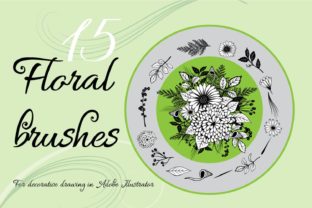
There is a distinct satisfaction in watching a complex floral composition take shape with just a few strokes of a stylus. For digital artists, the gap between a rigid, geometric line and an organic, flowing petal often comes down to the tools used. This is where a dedicated Floral Art Brushes for Adobe Illustrator set changes the workflow entirely. Instead of spending hours drawing individual leaves or petals from scratch, you can focus on the composition itself. The specific collection featuring 15 vector pattern brushes, drawn by hand on a graphic tablet and finalized in Adobe Illustrator CC, offers a bridge between traditional sketching freedom and digital precision.
These tools are not merely shortcuts; they are foundational elements that allow creators to build intricate designs rapidly. Because they are vector-based, every curve remains crisp whether it is printed on a business card or scaled up for a billboard. The set includes a bonus clipart collection, providing immediate assets for those who need to populate a scene quickly without customizing every element. However, the true power lies in the brushes themselves. By simply choosing a brush and drawing, users can generate stems, vines, and blooms that feel natural and varied.
Why Different Creators Value These Tools
The appeal of this brush set shifts depending on who is holding the digital pen. A freelancer racing against a deadline has different priorities than a hobbyist exploring a new artistic style. Understanding these nuances helps potential users decide if this tool fits their current ecosystem.
For beginners, the primary hurdle in digital art is often confidence. Starting with a blank canvas can be intimidating, especially when trying to replicate the fluidity of nature. These brushes lower the barrier to entry. Since the heavy lifting of creating the texture and shape of the flower is already done, a novice can focus on learning composition, color theory, and layering. The ease of use means they can produce professional-looking results early in their learning journey, which serves as a powerful motivator to keep practicing. They aren't just copying; they are learning how organic forms interact by manipulating pre-made, high-quality vectors.
Experienced professionals and agency designers, on the other hand, evaluate tools based on efficiency and scalability. In a commercial setting, time is a direct cost. A designer working on packaging for a tea brand or creating a wedding invitation suite needs reliability. They need to know that the brush will stroke smoothly without breaking the path or creating messy anchor points. Since these brushes were created in Adobe Illustrator CC, they integrate seamlessly into existing workflows. A senior designer can use them to block out a concept in minutes, present it to a client, and then refine the details. The fact that they are vector pattern brushes ensures that the final output is resolution-independent, a non-negotiable requirement for print production.
Practical Applications Across Industries
The versatility of floral vectors extends far beyond fine art. Different sectors leverage these assets to solve specific communication problems.
- Small Business Owners and Entrepreneurs: Many small businesses operate with limited budgets for branding. A boutique owner, a florist, or a handmade soap maker can use these brushes to create their own logos, social media graphics, and product labels. Instead of hiring a designer for every minor update, they have a flexible toolkit to maintain a consistent aesthetic. The included JPG preview files also help them visualize how the elements look before committing to a design.
- Bloggers and Content Marketers: In the world of content marketing, visual appeal drives engagement. A lifestyle blogger writing about spring gardening or a wellness coach creating a meditation guide can use these floral compositions to break up text and add warmth to their articles. The ability to recolor vector paths means the flowers can match any brand palette instantly, ensuring cohesive visual storytelling across a website or newsletter.
- Educators and Publishers: Teachers creating worksheets or publishers designing book covers often need decorative elements that are clean and clear. These brushes allow for the creation of educational materials about botany or literature supplements that feel inviting rather than sterile. The bonus clipart set is particularly useful here for adding quick accents without needing to draw custom illustrations for every page.
Evaluating Quality and Usability
When considering a download like this, several factors determine its long-term value. The most critical aspect is the origin of the brushes. Because these were drawn by hand on a graphic tablet, they retain the subtle imperfections and pressure variations that make art feel human. Automated or algorithmically generated brushes often look too perfect, resulting in repetitive and lifeless patterns. Hand-drawn vectors capture the nuance of a real artist's touch, which translates to more organic final compositions.
Flexibility is another key metric. Vector pattern brushes in Illustrator allow users to adjust stroke weight, color, and opacity dynamically. You can stretch a vine to fit a specific frame or thicken a stem to match a bold typography choice. This level of control is superior to using static PNG images, which pixelate when resized and cannot be easily edited. The inclusion of 15 distinct brushes provides enough variety to prevent designs from looking repetitive, allowing for dense, lush arrangements or sparse, minimalist accents.
However, it is vital to note technical limitations to ensure the tool matches your software environment. These brushes are for Illustrator only and they are NOT working in Photoshop. This is a crucial distinction for users who primarily work in raster-based programs. While Photoshop has its own brush engines, vector pattern brushes rely on Illustrator's specific path-handling capabilities. Users must have access to Adobe Illustrator CC to utilize the .ai file included in the ZIP archive. For those deeply embedded in the Adobe ecosystem, this is rarely an issue, but it is an important checkpoint for hobbyists using alternative software.
Making the Right Choice for Your Projects
Deciding whether to incorporate this set into your library depends on your current goals. If you are looking to speed up your workflow while maintaining a hand-crafted aesthetic, these brushes offer a significant advantage. They are ideal for projects requiring a soft, natural touch, such as wedding stationery, cosmetic packaging, or greeting cards.
For the creator who enjoys the process of building scenes, the bonus clipart set adds extra value. It allows for a hybrid approach: using brushes for the main structural elements like winding branches and using the clipart for detailed focal points. This combination maximizes speed without sacrificing detail.
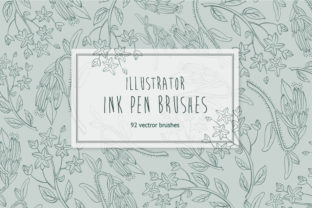
Ultimately, the goal of any creative tool is to get out of the way and let your ideas flow. Whether you are a marketer needing a quick graphic for a campaign, a student learning vector illustration, or a seasoned pro refining a client's brand identity, the right resources make the difference between a struggle and a seamless creation process. By scrolling through the available images and seeing how the brushes perform in real compositions, you can better gauge if the style aligns with your vision. As the creator continues to add more examples and potentially expand the set, the utility of these tools grows, offering a lasting resource for anyone looking to bring the beauty of nature into their digital designs.