Evaluating the 45 Animal Claw Photoshop Brushes for High-Resolution Digital Art
In the realm of digital photo manipulation and concept art, the difference between a convincing composite and an obvious edit often lies in the texture and detail of the overlays used. For artists working on horror themes, fantasy creatures, or rugged environmental designs, finding high-quality claw marks is essential. The 45 Animal Claw Photoshop Brushes set offers a specific solution to this need, providing a curated collection of textures designed to simulate the physical impact of animal attacks on various surfaces. With a resolution of 2500 pixels and compatibility extending back to Photoshop CS6, this resource targets professionals and hobbyists who require reliability across different software environments.
When evaluating digital assets, it is crucial to look beyond the marketing imagery and understand the technical specifications and practical applications. This collection distinguishes itself not just by the quantity of brushes included, but by the fidelity of the brush tips and the versatility they offer in a workflow. Whether you are creating visual effects for a game asset or adding subtle distress to a portrait, understanding where this tool fits within your existing library is key to making an informed decision.
Technical Specifications and Compatibility Considerations
The foundation of any useful digital brush set is its technical robustness. The 45 Animal Claw Photoshop Brushes are engineered with a maximum size of 2500 pixels. In the context of modern digital art, this resolution is significant. Many free or lower-tier brush sets cap their tip sizes at 1000 or 1500 pixels, which can result in pixelation or loss of detail when applied to large canvases, such as those used for print media or 4K concept art. A 2500-pixel tip allows the artist to stamp a single, high-definition claw mark that retains its edge definition even when scaled down slightly or viewed on high-DPI monitors.
Furthermore, compatibility is a major decision factor for many studios and freelancers who may not have upgraded to the latest Creative Cloud subscription immediately. These brushes are confirmed to work with any Photoshop CS6 version and newer. This backward compatibility is a strong selling point for users operating on older hardware or those who prefer the stability of perpetual license versions of the software over the subscription model. It ensures that the investment remains usable regardless of future software shifts, provided the core engine remains similar.
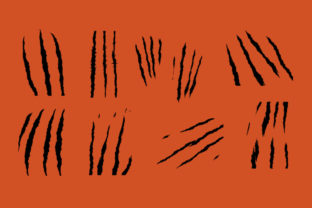
Inside the package, users receive 45 distinct brushes. While the number alone does not guarantee quality, in this specific category, variety is paramount. Animal claws vary significantly depending on the species—compare the curved, slicing talons of a raptor to the blunt, crushing force of a bear or the delicate scratches of a feline. A comprehensive set should reflect this biological diversity. These brushes aim to cover that spectrum, offering different angles, pressures, and tear patterns that mimic real-world physics.
Comparative Analysis: Dedicated Sets vs. General Texture Libraries
When searching for claw effects, artists generally encounter two types of resources: general grunge texture packs and dedicated anatomical brush sets. Understanding the trade-offs between these approaches helps in selecting the right tool for the job.
General grunge libraries often include "scratch" or "tear" brushes as a small subset of a larger collection containing hundreds of dust, smoke, and concrete textures. The advantage here is breadth; one download provides solutions for multiple problems. However, the limitation is often specificity. Generic scratch brushes tend to look abstract or mechanical, lacking the organic curvature and depth associated with actual animal anatomy. They may work for weathering a metal surface but fail to convince when simulating a creature attack on skin or fabric.
In contrast, the 45 Animal Claw Photoshop Brushes represent a specialized approach. By focusing exclusively on claw mechanics, these brushes typically offer more nuanced control over the shape of the wound. They are more likely to include variations that account for the drag of flesh or the splintering of wood, rather than just a static line. For a project where the claw mark is a focal point—such as a movie poster or a character design sheet—the specialized nature of this set usually yields superior results compared to digging through a generic grunge pack.
Another alternative is creating custom brushes from scratch using stock photography. While this offers the highest level of customization, it is time-consuming. It requires sourcing high-resolution photos of claws, isolating them, adjusting levels, and defining brush presets. For professionals billing by the hour, the time saved by purchasing a pre-made, high-resolution set like this often outweighs the cost, allowing them to focus on composition and lighting rather than asset creation.
Practical Applications and Workflow Integration
The utility of these brushes extends across several disciplines within the digital arts. Their high resolution and specific texturing make them suitable for a variety of use cases:
- Digital Photo Manipulation: In composite photography, realism is the goal. These brushes can be used to add injury details to models, simulate damage on vehicles in post-apocalyptic scenes, or create the illusion of a creature passing through a environment. The key here is blending; because the brushes are high resolution, they respond well to opacity changes and blending modes like "Multiply" or "Overlay," allowing them to integrate seamlessly with the underlying photo texture.
- Game Art and Concept Design: Concept artists often need to quickly iterate on ideas. When designing a monster or an environment, being able to rapidly stamp credible claw marks helps communicate scale and threat level. The 2500-pixel size ensures that these details remain crisp even when the concept art is presented on large screens during pitch meetings.
- Graphic Design and Decorative Elements: Beyond literal interpretations, these textures serve as decorative elements for horror-themed event flyers, album covers, or book jackets. They add a layer of tactile aggression that vector shapes often cannot replicate.
It is important to note that while these brushes are powerful, they are tools, not magic wands. Effective use requires an understanding of light and shadow. Simply stamping a black claw mark onto a lit surface will look flat. To maximize the potential of the 45 Animal Claw Photoshop Brushes, artists should consider using them on separate layers, applying layer styles for bevel and emboss to simulate depth, and painting in shadows manually to match the scene's light source.
Limitations and Decision Factors
Despite their strengths, this specific brush set may not be the ideal solution for every scenario. Recognizing these limitations is part of a balanced evaluation.
First, the style of the brushes is inherently realistic and gritty. If your project involves a cartoonish, cel-shaded, or highly stylized aesthetic, these high-fidelity textures might clash with the overall art direction. In such cases, hand-drawn vector shapes or simpler, stylized brush tips might be more appropriate. The detailed noise and texture within these 2500-pixel tips could distract from clean, flat-color illustrations.
Second, file size and performance can be a consideration. High-resolution brush tips consume more memory. While modern computers handle this easily, users working on older machines with limited RAM might experience slight lag when switching between these large brushes frequently. However, given the compatibility with CS6, the developers have likely optimized the file structure to mitigate this, but it remains a factor for those with minimal hardware.
Finally, consider the scope of your project. If you only need a single type of scratch for a minor background element, a full set of 45 brushes might be overkill. However, for artists who regularly deal with creature design, horror themes, or destruction effects, having a diverse arsenal prevents repetition. Using the same brush stamp multiple times creates a recognizable pattern that breaks immersion; a set of 45 variations ensures that every mark looks unique and organic.
Making the Right Choice for Your Toolkit
Deciding whether to incorporate the 45 Animal Claw Photoshop Brushes into your workflow depends on your specific needs and current resource gaps. If your current library lacks organic damage textures or if you find yourself constantly modifying generic scratch brushes to look like animal attacks, this set fills a clear void. The combination of high resolution (2500px) and broad software compatibility (CS6+) makes it a safe, long-term addition to a professional toolkit.
Conversely, if your work is strictly vector-based, focused on soft pastel illustrations, or if you already possess a massive, specialized library of creature assets that you are comfortable with, the incremental benefit may be lower. Always evaluate new resources against your actual project pipeline. For those who prioritize realism, efficiency, and cross-version stability, this collection represents a pragmatic choice that balances quality with versatility.
Ultimately, the value of any digital asset is measured by how much it enhances the final output without hindering the creative process. These brushes offer a targeted solution for a specific visual problem, providing the detailed, high-resolution textures necessary to bring dangerous, dynamic elements to life in your digital compositions.