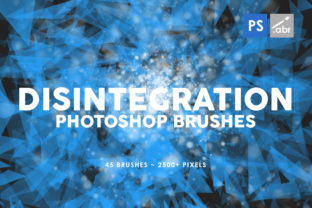
45 Disintegration Photoshop Brushes for High-Res Art
In the world of digital art and photo manipulation, the difference between a good composition and a stunning one often lies in the details. Specifically, it is found in how elements interact with their environment and how they transition into nothingness. Achieving a realistic disintegration effect manually—painting individual particles, dust, and ash—is an incredibly time-consuming process that can stall even the most experienced designer. This is where a specialized toolkit becomes essential. The 45 Disintegration Photoshop Brushes collection offers a streamlined solution for creators looking to add dynamic decay, dispersion, or particle effects to their work without sacrificing hours of labor.
This comprehensive set includes 45 distinct brushes inside, each engineered to deliver high-fidelity results. With a massive 2500 pixels size, these textures provide the resolution necessary for large-format prints, high-definition game assets, and detailed cinematic composites. Because they are designed to work with any Photoshop version, they remain a versatile asset regardless of your current software setup. Whether you are a freelancer rushing to meet a deadline or a hobbyist experimenting with surreal imagery, understanding how to leverage these specific tools can significantly elevate the quality of your output.
Accelerating Workflow Without Compromising Quality
The primary value of integrating these brushes into your workflow is efficiency. In professional settings, time is often as critical as creativity. Manually masking and painting out sections of an image to create a "fading away" effect requires precision and patience. By utilizing pre-made disintegration textures, you reduce a task that might take thirty minutes down to a few clicks. You simply select the brush, adjust the opacity or flow to suit the lighting of your scene, and apply the stroke.
However, speed should never come at the cost of visual fidelity. Many free or low-quality brush sets suffer from pixelation when scaled up, ruining the illusion of realism. These brushes address that issue directly with their 2500 pixels size. This high resolution ensures that when you apply the effect to a 4K image or a large poster, the edges of the particles remain crisp and defined. There is no blurring or blockiness, which maintains the professional polish required for client work or published portfolios. For marketers and small business owners creating ad creatives, this means producing high-end visuals rapidly, allowing for more iterations and better A/B testing of visual concepts.
Versatile Applications Across Creative Industries
While the name suggests a specific function, the utility of these 45 Disintegration Photoshop Brushes extends far beyond simple object destruction. Their versatility makes them a valuable addition to various projects, serving as photo overlays, digital manipulation tools, game visual effects, and decorative elements.
For digital photo manipulators and surrealist artists, these brushes are indispensable for blending disparate elements. When combining a portrait with a landscape, hard edges can make the composite look fake. Using a disintegration brush on the edges of the subject allows them to merge organically with the background atmosphere, such as turning into mist or sand. This technique creates a dreamlike quality that engages viewers and encourages them to look closer at the artwork.
In the realm of game development and concept art, visual storytelling is key. Characters fading into dust can symbolize loss, magic, or transformation. Developers can use these high-resolution textures to create spell effects, death animations, or environmental hazards. Since the brushes work with any Photoshop version, concept artists can quickly mock up these effects during the pre-production phase to communicate ideas to the 3D modeling team before writing complex code for particle systems.
Furthermore, bloggers and content creators can use these as decorative elements to draw attention to specific parts of an infographic or social media post. A text headline that appears to be crumbling away can create a sense of urgency or drama, increasing click-through rates. The key is to use the effect intentionally to support the message rather than just applying it for aesthetic noise.
Maximizing Realism Through Technique
Owning the tools is only half the battle; knowing how to use them effectively determines the final outcome. To get the most out of this set, consider the physics of the material you are simulating. Not all disintegration looks the same. Smoke behaves differently than shattering glass or turning to ash. With 45 different variations included in the pack, you have a wide vocabulary of textures at your disposal.
Start by analyzing the light source in your base image. If the light is coming from the left, the particles dispersing should ideally catch that light. You may need to adjust the brightness or contrast of the brush stamp itself or apply a subtle inner glow layer style to the painted area. Additionally, vary the size of the brush as you paint. Using a single size throughout can create a repetitive, unnatural pattern. Switch between larger chunks and fine dust to mimic the chaotic nature of real-world breakdown.
Layering is another crucial technique. Instead of applying the effect on the main image layer, paint the disintegration on a separate layer. This non-destructive approach allows you to mask out areas that don't fit, change the blending mode to "Screen" or "Overlay" for better integration, or lower the opacity if the effect feels too heavy. This flexibility is vital when refining a piece for a discerning client or a high-stakes publication.
Who Benefits Most from This Toolkit?
This collection is particularly beneficial for freelancers and entrepreneurs who manage multiple roles within their business. For a solo graphic designer, having a reliable library of effects means less time searching for assets and more time billing for strategic work. Educators teaching digital arts can also use these brushes to demonstrate advanced compositing techniques to students, providing them with industry-standard resources to practice on.
Publishers and authors designing book covers often rely on dramatic imagery to sell stories, especially in the sci-fi and fantasy genres. The ability to quickly generate high-quality disintegration effects can make a cover stand out on a crowded digital shelf. Similarly, marketers launching campaigns centered around themes of change, disruption, or innovation can use these visual metaphors to strengthen their communication.
Considerations and Best Practices
While these brushes are powerful, they are not a magic wand that fixes poor underlying composition. They work best when the base image has appropriate lighting and perspective. Applying a heavy disintegration effect to a flat, poorly lit photo will likely highlight the flaws rather than hide them. It is important to ensure that the direction of the dispersion matches the narrative flow of the image. For instance, if wind is blowing from the right in the scene, the particles should not drift to the left unless there is a specific supernatural reason for it.
Additionally, while the 2500 pixels size offers great detail, using the brush at 100% scale on a very small web graphic might overwhelm the design. Always scale the brush tip size appropriately for your canvas dimensions. Context matters; a subtle hint of erosion often looks more sophisticated than a complete obliteration of the subject.
Ultimately, the 45 Disintegration Photoshop Brushes represent a practical investment in your creative arsenal. They solve the specific problem of creating complex particle effects efficiently while maintaining the high resolution required for professional outputs. By integrating these tools thoughtfully, you can enhance your visual storytelling, save valuable production time, and achieve a level of polish that resonates with audiences across all media platforms.