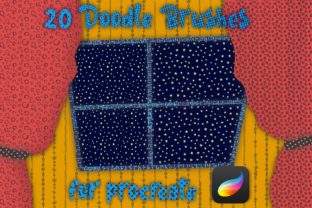
Bringing Hand-Drawn Life to Digital Art with Doodle Texture Brushes for Procreate
Digital art often suffers from a specific kind of sterility. When you swipe an Apple Pencil across a glass screen, the result is frequently too smooth, too perfect, and lacking the organic grit that makes traditional media so appealing. This is where Doodle Texture Brushes for Procreate change the game. Specifically, collections like the set of 20 Doodle Pattern brushes offer a shortcut to achieving that hand-crafted look without needing to scan paper or mix physical paints. These tools are designed to be incredibly simple and easy to use, allowing creators to inject personality into their work instantly.
The core value of these brushes lies in their ability to mimic real-world textures. Whether it is the grain of rough watercolor paper, the stippling of an old ink pen, or the uneven stroke of a charcoal stick, these digital assets replicate the imperfections that make art feel human. For a freelancer working on a tight deadline or a hobbyist wanting to elevate their Instagram posts, having a reliable set of texture brushes means less time fiddling with layer settings and more time creating.
Real-World Applications for Creators and Businesses
It is easy to think of texture brushes as purely decorative elements for fine art, but their utility extends far beyond drawing pretty pictures. In the current digital landscape, authenticity is a currency. Brands and individuals are constantly searching for ways to stand out in a feed saturated with polished, corporate graphics. Doodle Texture Brushes for Procreate provide a practical solution for this across various professional scenarios.
Consider a small business owner managing their own social media marketing. They might need to create a promotional graphic for a weekend sale. Using standard digital fonts and solid colors can look generic. However, by applying a doodle texture overlay or using a textured brush to hand-letter the headline, the post immediately feels more approachable and artisanal. It signals to the customer that there is a real person behind the brand, not just an algorithm.
Educators and course creators also find immense value in these tools. When designing worksheets, presentation slides, or educational infographics, a clean vector look can sometimes feel cold or intimidating to students. Incorporating hand-drawn elements created with 20 Doodle texture brushes for Procreate adds warmth. A teacher could sketch a quick diagram with a grainy ink brush to explain a concept, making the material feel like a personal note rather than a textbook excerpt. This subtle shift in visual tone can improve engagement and retention.
Enhancing Digital Planners and Journals
The market for digital planning has exploded in recent years, with thousands of users organizing their lives on iPads. For the creators who sell these planners on platforms like Etsy, differentiation is key. A planner page that looks exactly like a generic PDF template is forgettable. By integrating doodle patterns and textures, designers can create themes that resonate emotionally.
Imagine a "cozy autumn" planner spread. Using a specific brush from a texture pack to create a knitted sweater pattern background or a leafy border adds depth that flat colors cannot achieve. For the end-user, interacting with these textured elements makes the digital journaling experience feel tactile, bridging the gap between writing in a physical notebook and typing on a screen. The simplicity of these brushes ensures that even those with limited drawing skills can add these embellishments quickly.
Why Simplicity Matters in Workflow
One of the most significant barriers to adopting new digital tools is the learning curve. Many advanced brush sets require complex adjustments to opacity, flow, and streamline settings to work correctly. This is not the case with high-quality Doodle Texture Brushes for Procreate. The premise of sets featuring 20 distinct pattern brushes is that they are ready to go out of the box.
For a busy entrepreneur or a parent trying to squeeze in creative time during nap hours, efficiency is paramount. You do not want to spend twenty minutes tweaking a brush setting just to draw a single line. These brushes are engineered to deliver consistent results with a single stroke. This reliability allows the user to stay in a "flow state," where the focus remains on the idea rather than the tool. When a tool disappears into the background of your workflow, that is when it becomes truly useful.
Furthermore, the versatility of having a curated set of 20 patterns means you have a mini-library of effects at your fingertips. One brush might be perfect for creating a vintage newspaper effect, while another excels at adding noise to a solid color block to reduce banding. Having this variety in one package prevents the need to hunt down individual assets from different sources, streamlining the asset management process for professionals.
Choosing the Right Tools for Your Needs
Before downloading or purchasing any digital asset, it is wise to consider how it fits into your existing ecosystem. While 20 Doodle Pattern brushes for Procreate are designed for universal appeal, thinking about your specific style goals is important. Are you aiming for a gritty, urban aesthetic, or a soft, whimsical vibe? Most texture packs lean towards a specific mood, so reviewing examples is crucial.
Users should also consider the resolution of their typical canvas. High-resolution textures hold up better when printed or viewed on large screens, whereas lower-resolution brushes might pixelate if scaled up too much. Since these doodle brushes are often used for overlays and patterns, ensuring they tile seamlessly or scale well is a practical consideration for commercial projects like packaging design or large-format prints.
Another factor is compatibility. Ensure that the brush file format is compatible with your version of Procreate. While most modern brushes work across recent updates, checking developer notes can save frustration. Additionally, think about licensing. If you plan to use the textures created with these brushes in a logo or a product for sale, verify that the creator allows commercial use. Most reputable creators provide clear guidelines, but it is always better to check beforehand to avoid legal headaches down the road.
The Impact on Creative Confidence
Beyond the technical benefits, there is a psychological advantage to using tools that mimic traditional media. Many people feel intimidated by the blank white canvas of a digital app, feeling pressure to create something "perfect" because the medium allows for infinite undo steps. Doodle Texture Brushes for Procreate reintroduce a sense of organic unpredictability.
When a brush leaves a slightly uneven edge or a textured trail, it encourages the artist to embrace imperfection. This can be liberating for perfectionists who struggle to let go of control. It shifts the mindset from "I must draw a straight line" to "I am creating a mark with character." For bloggers and content creators who may not identify as trained artists, this lowers the barrier to entry. They can create custom headers, icons, and illustrations that look professional and hand-made without needing years of formal training.
In conclusion, integrating these texture tools into your digital toolkit is less about adding more files to your library and more about expanding your visual vocabulary. Whether you are designing a marketing campaign, journaling your daily thoughts, or illustrating a children's book, the right texture can transform a flat image into a story. The availability of simple, effective sets like the 20 Doodle Pattern brushes ensures that adding this layer of depth is accessible to everyone, regardless of their skill level or available time.