Mastering Light and Texture with 100 Spotlight Photoshop Brushes
In the realm of digital artistry and photo manipulation, lighting is often the difference between a flat, uninteresting image and a captivating visual story. While software tools have evolved to offer complex rendering engines, there remains an undeniable efficiency and artistic charm in using hand-crafted brush assets. This is where the 100 Spotlight Photoshop Brushes collection becomes an invaluable resource for creators ranging from hobbyists to seasoned professionals. Designed to integrate seamlessly into any workflow, this extensive pack offers high-resolution textures that simulate natural and artificial light sources, providing a versatile toolkit for enhancing digital projects.
The Power of High-Resolution Textures
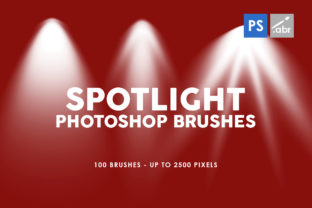
One of the most critical factors in selecting digital assets is resolution. Low-quality brushes can pixelate when scaled, ruining the illusion of realism. The 100 Spotlight Photoshop Brushes address this concern directly by offering textures with dimensions up to 2500 pixels. This high resolution ensures that whether you are working on a small web banner or a large-format print, the details remain crisp and clean.
These brushes are not merely simple circles of white; they are complex textures that mimic the behavior of light interacting with atmospheric particles, lenses, and physical obstacles. When applied, they add depth and dimension, allowing artists to create volumetric lighting effects—often referred to as "god rays"—without needing to master complex 3D rendering software. The inclusion of 100 brushes inside the package means that users have a vast library of variations at their fingertips, preventing repetitive patterns and ensuring each project maintains a unique aesthetic.
Universal Compatibility and Ease of Use
A common frustration for digital artists is purchasing assets that require specific, expensive versions of software to function. However, this collection is engineered for accessibility. It works with any Photoshop version, making it an inclusive tool for students, freelancers, and agencies alike. Whether you are running a legacy version of the software on an older machine or the latest Creative Cloud release, these brushes install instantly and perform reliably.
The ease of use extends beyond compatibility. Because these are standard brush presets, they behave like any native tool within the interface. Users can adjust opacity, flow, size dynamics, and blending modes to suit their specific needs. This flexibility allows for a non-destructive workflow, where lighting effects can be tweaked, masked, or removed entirely without altering the original underlying image data.
Diverse Applications Across Industries
The versatility of the 100 Spotlight Photoshop Brushes makes them suitable for a wide array of applications. Their utility stretches far beyond simple photo editing, finding homes in game design, marketing materials, and fine digital art.
- Photo Overlays and Manipulation: Photographers often deal with less-than-perfect lighting conditions during a shoot. These brushes allow for the post-production addition of dramatic sun flares, soft window light, or harsh stage spotlights to salvage or enhance an image.
- Visual Effects for Games: Concept artists and UI designers can use these textures to create atmospheric backgrounds or dynamic lighting effects for 2D games, adding a layer of polish that elevates the player's immersion.
- Digital Artwork and Illustration: Painters can use the brushes to block in lighting schemes quickly or add final highlights that make characters and environments pop off the canvas.
- Decorative Elements: For graphic designers creating posters, album covers, or social media graphics, these brushes serve as excellent decorative elements that draw the viewer's eye to specific focal points.
Real-World Scenarios: Bringing Concepts to Life
To understand the true value of this collection, consider a few practical scenarios. Imagine a real estate photographer who has taken a stunning interior shot, but the room feels slightly dim and lacks the warmth of a sunny afternoon. By selecting a soft, diffused spotlight brush from the 100 Spotlight Photoshop Brushes set and applying it near a window area with a "Screen" blending mode, the photographer can instantly simulate sunlight streaming in, making the space feel inviting and bright.
Alternatively, consider a movie poster designer working on a thriller. The composition requires a sense of mystery and tension. Using one of the harder, more focused spotlight textures, the designer can isolate the protagonist in a beam of light while letting the surroundings fall into shadow. The high resolution ensures that even when the poster is printed on a billboard, the edge of the light beam remains smooth and realistic, free from jagged artifacts.
In the gaming industry, a UI artist might need to create a menu screen that feels magical or ethereal. By layering multiple brushes from the pack with varying opacities and colors, they can construct a dynamic background that suggests moving light sources, adding life to what would otherwise be a static interface.
Evaluating Suitability for Your Projects
While the 100 Spotlight Photoshop Brushes are incredibly powerful, it is important to evaluate how they fit into your specific workflow. These tools are best suited for projects that require an organic, textured look rather than mathematically perfect vector lighting. If your goal is photorealism, the key lies in subtlety. Overusing these effects can make an image look cluttered or artificial.
When deciding if this pack is right for you, consider the following:
- Project Scale: If you frequently work on large-scale prints or high-definition screens, the 2500-pixel capacity is a significant advantage. For small web icons, standard brushes might suffice, but having high-res options future-proofs your work.
- Style Consistency: With 100 variations, you can maintain a consistent lighting style across a series of images while avoiding repetition. This is crucial for branding campaigns or storytelling sequences.
- Time Efficiency: Creating custom light brushes from scratch can take hours of scanning and digitizing. This collection offers an immediate solution, allowing you to focus on creativity rather than asset creation.
Strengths and Practical Considerations
The primary strength of this collection lies in its balance of quantity and quality. Many free brush packs offer hundreds of low-quality items, but the 100 Spotlight Photoshop Brushes prioritize resolution and usability. The fact that they function as photo overlays means they can also be used in other software that supports layer blending, such as Affinity Photo or GIMP, provided the brush files can be imported or the textures extracted.
However, users should keep in mind that lighting is contextual. A spotlight brush designed for a night scene may look out of place in a midday setting unless the color temperature and opacity are adjusted. It is always recommended to experiment with hue/saturation adjustment layers clipped to the brush stroke to match the ambient light of your specific composition. Furthermore, while the brushes are high resolution, applying them at 100% opacity on every layer can result in a "washed out" look. Mastery comes from understanding how to layer these effects subtly.
Conclusion: An Essential Tool for Modern Creators
In conclusion, the 100 Spotlight Photoshop Brushes represent a substantial upgrade to any digital artist's toolkit. They bridge the gap between technical limitation and creative vision, offering a straightforward way to manipulate light and atmosphere. Whether you are a business owner looking to enhance your marketing visuals, a game developer needing quick assets, or an artist seeking to refine your digital paintings, this collection provides the necessary resources to elevate your work.
By combining high-resolution textures, universal compatibility, and a diverse range of styles, this pack eliminates the guesswork involved in creating lighting effects. It empowers users to focus on the narrative and emotional impact of their images, ensuring that the final result is not just seen, but felt. As digital media continues to demand higher standards of quality, having reliable, professional-grade tools like these is no longer a luxury—it is a necessity for anyone serious about visual communication.