Unlocking Creative Potential with High-Resolution Freeze Effects
In the fast-paced world of digital art and photo manipulation, texture is often the unsung hero that separates a flat, amateur composition from a professional, immersive piece. Whether you are designing a winter-themed advertisement, creating concept art for a video game, or simply enhancing a portrait with atmospheric elements, the right tools can drastically reduce your workflow time while elevating the final output. This is where specialized assets like the 30 Freeze Photoshop Stamp Brushes come into play, offering artists a robust toolkit to simulate ice, frost, and crystalline structures with unprecedented ease.
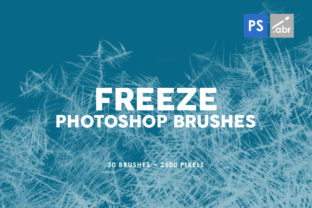
The collection features 30 unique brushes packed inside a single, easy-to-install file, each designed to deliver high-fidelity results. What sets this specific set apart is the sheer resolution; with capabilities up to 2500 pixels in size, these stamps retain their crispness even when applied to large-format prints or high-definition screens. Unlike lower-resolution alternatives that pixelate when scaled up, these textures remain sharp, ensuring that every shard of ice and every delicate frost pattern looks authentic. Furthermore, compatibility is rarely an issue, as these brushes work seamlessly with any Photoshop version, making them accessible to veterans using legacy software and newcomers utilizing the latest Creative Cloud updates.
The Power of High-Resolution Textures in Digital Workflows
When discussing digital painting or photo editing, resolution is paramount. A brush that looks decent at 500 pixels can become a blurry mess when stretched across a 4K canvas. The 30 Freeze Photoshop Stamp Brushes address this common pain point head-on. By providing source textures that go up to 2500 pixels, they allow designers to cover large areas of an image without losing detail. This is particularly crucial for industries like gaming and film, where assets are often viewed on massive displays or zoomed in for close-up shots.
Consider the workflow of a concept artist working on a frozen tundra level for an RPG. Instead of hand-painting every snowflake or ice crystal—a process that could take hours—they can utilize these stamp brushes to lay down the foundational texture instantly. The high resolution ensures that when the camera zooms in on a character's armor covered in frost, the texture holds up under scrutiny. This efficiency allows artists to focus more on composition, lighting, and storytelling rather than getting bogged down in repetitive texturing tasks.
Versatility Across Different Creative Projects
The utility of these brushes extends far beyond simple winter scenes. While their primary function is to simulate freezing conditions, their application is limited only by the user's imagination. Here are several ways professionals integrate these tools into modern projects:
- Photo Overlays and Manipulation: Photographers often need to add atmospheric depth to portraits or landscapes. Applying a subtle layer of frost to the edges of a lens or adding ice crystals to a subject's hair can transform a standard shot into a magical, editorial image. The transparency and blending modes in Photoshop allow these 30 Freeze Photoshop Stamp Brushes to interact naturally with underlying photos.
- Game Asset Creation: Environment artists use these textures to create weathered surfaces. Imagine a sword left out in the cold or a window pane in a dystopian sci-fi setting. These brushes provide the necessary visual cues to sell the environment's temperature and history.
- Graphic Design and Typography: Text effects are a staple in movie posters and album covers. Using freeze textures to mask text or create icy borders adds a tactile quality to vector designs, making them feel organic and grounded.
- Digital Painting: For illustrators, these stamps serve as excellent starting points. They can be used as a base layer over which the artist paints, adding complexity and realism to hand-drawn ice formations that might otherwise look too smooth or artificial.
Why Compatibility and Ease of Use Matter
One of the most frustrating experiences for a digital artist is downloading a premium resource only to find it requires a specific plugin or a newer version of software that they do not own. The developers behind this collection understood that friction kills creativity. Consequently, these 30 Freeze Photoshop Stamp Brushes are engineered to work with any Photoshop version. Whether you are running CS6 on an older workstation or the latest 2024 release on a high-end tablet, the installation process is straightforward, and the performance is optimized.
This universal compatibility ensures that teams working in collaborative environments can share files without worrying about missing assets or version conflicts. It also means that students and hobbyists who may not have the budget for the latest software subscriptions can still access professional-grade tools. The "plug-and-play" nature of the set allows users to start creating immediately after import, bypassing complex configuration steps.
Achieving Realism Through Variety
Repetition is the enemy of realism. If you use the same ice stamp fifty times in a row, the human eye will quickly detect the pattern, breaking the immersion of the artwork. This is why having a diverse set is critical. With 30 distinct brushes included in the pack, artists have a wide vocabulary of shapes at their disposal. Some stamps mimic fine, powdery frost, while others replicate thick, jagged icicles or cracked glass surfaces.
By rotating through different stamps within the set, creators can build complex, non-repetitive textures. For instance, when creating a frozen lake surface, one might use a broad, soft stamp for the general misty overlay, followed by sharper, detailed stamps for the cracks near the foreground. This layering technique, facilitated by the variety in the 30 Freeze Photoshop Stamp Brushes, creates a sense of depth and organic chaos that mirrors the natural world.
Practical Tips for Maximizing Your Results
To get the most out of these high-resolution assets, it is helpful to understand how they interact with Photoshop's blending engine. Simply stamping the brush onto a layer at 100% opacity can sometimes look too harsh. Here are a few practical recommendations for integrating these textures effectively:
- Experiment with Blending Modes: Try setting the brush layer to "Overlay," "Soft Light," or "Screen." These modes often blend the white and grey tones of the ice textures with the colors of the background image much more naturally than the default "Normal" mode.
- Adjust Opacity and Flow: Don't be afraid to lower the flow of the brush. Building up the effect with multiple light strokes often yields a more realistic accumulation of snow or frost than a single heavy click.
- Use Layer Masks: After applying the freeze effect, use a layer mask to erase parts of the texture where it doesn't make logical sense, such as over heat sources or in areas that should remain clear. This adds a layer of intentionality to the design.
- Combine with Color Grading: Ice isn't just white; it reflects the environment. Add a slight blue or cyan color overlay to the brushed areas to match the ambient lighting of your scene, ensuring the 30 Freeze Photoshop Stamp Brushes feel integrated rather than pasted on.
The Economic Value of Quality Assets
In the professional realm, time is money. Spending hours crafting a custom ice texture from scratch might be feasible for a personal project, but it is rarely efficient for client work with tight deadlines. Investing in a high-quality set like this pays for itself by slashing production time. The ability to drag and drop a 2500-pixel high-res texture that already looks perfect allows designers to meet deadlines without compromising on quality.
Moreover, the versatility of the pack means it serves as a long-term investment. It isn't a one-use tool for a single Christmas flyer; it is a permanent addition to the library that can be pulled upon for horror games, sci-fi interfaces, fantasy illustrations, and commercial photography year after year. The durability of the asset, combined with its forward-compatible design, ensures it remains useful regardless of how software evolves.
Ultimately, the goal of any digital artist is to convey a message or emotion as clearly and beautifully as possible. Tools that remove technical barriers and enhance visual fidelity are invaluable. The 30 Freeze Photoshop Stamp Brushes offer exactly that: a bridge between imagination and execution. By providing high-resolution, versatile, and universally compatible textures, they empower creators to push the boundaries of their projects, adding that essential chill factor that makes an image truly memorable. Whether you are a seasoned retoucher or a budding digital painter, incorporating these elements into your workflow can open new avenues for creative expression and technical excellence.