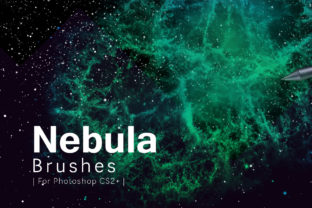
Stunning Nebula Photoshop Brushes for Cosmic Art
Creating realistic space scenes in digital art often feels like an uphill battle. You spend hours trying to blend colors, soften edges, and create that ethereal glow that defines a galaxy, only to end up with something that looks flat or muddy. This is where Nebula Photoshop Brushes change the game entirely. Instead of building complex cloud formations from scratch using standard round brushes and layer masks, these specialized tools allow you to paint intricate cosmic structures with a single stroke. They are designed to mimic the organic, swirling nature of interstellar gas and dust, giving your artwork immediate depth and atmosphere.
The core appeal of this specific collection lies in its versatility and resolution. You aren't just getting a few low-quality stamps; you are accessing 16 Nebula Photoshop Brushes PNG that are incredibly high-quality. With dimensions ranging from 3391 to 4745 pixels wide, these assets are built for professional use. Whether you are designing a massive website banner, a print poster, or a detailed concept art piece, the resolution ensures that your nebulae remain crisp and detailed even when scaled up. There is nothing worse than painting a beautiful scene only to find your texture becomes pixelated upon export, but these brushes eliminate that risk completely.
Why High-Resolution Assets Matter for Your Workflow
When working on commercial projects or high-end personal art, the quality of your source materials dictates the quality of your final output. Many free brush sets available online are often small, meant for web icons rather than full-scale illustrations. In contrast, having brushes that start at over 3000 pixels wide gives you the freedom to work non-destructively. You can apply a brush stroke on a large canvas, scale it down to fit a specific corner of your composition, and still retain perfect edge definition. This flexibility is crucial for freelancers and small business owners who need to adapt one design asset across various media formats, from social media posts to large-format prints.
Furthermore, the inclusion of Transparent nebula PNG images alongside the actual brush files adds another layer of utility. Sometimes, you don't want to paint the effect manually; you might just need a ready-made cloud formation to drop into a background. These PNGs act as instant overlays. Because they are transparent, they blend seamlessly with your existing layers using blending modes like "Screen," "Overlay," or "Soft Light." This dual approach—having both active brushes and static images—caters to different working styles. A beginner might prefer dragging and dropping the PNGs to see immediate results, while a seasoned digital painter will love the control offered by the brush engine.
Tailored Compatibility for Every User
One of the most frustrating aspects of downloading new digital tools is compatibility issues. Software updates frequently change how files are structured, leaving users with older versions of Photoshop unable to open new resources. This collection solves that problem by providing distinct versions for different software generations. You will receive Nebula Photoshop Brushes CS6 version files, which are optimized for the more modern interface and engine features found in Creative Suite 6 and the subsequent Creative Cloud releases. These versions often support better pressure sensitivity dynamics and scattering options.
However, the developers haven't forgotten those who are still running legacy software. The package also includes Nebula Photoshop Brushes for CS5 and earlier versions. This is a vital consideration for educators working in schools with older computer labs, or hobbyists who prefer stable, older versions of the software without a subscription model. By ensuring backward compatibility, this toolset becomes accessible to a wider audience, removing the technical barrier that often stops people from upgrading their creative library. It demonstrates a thoughtful approach to user needs, acknowledging that not everyone is on the latest update cycle.
Practical Applications Across Different Industries
The utility of these brushes extends far beyond just creating sci-fi book covers. While creators and concept artists certainly use them to build alien worlds and futuristic cityscapes, the applications are much broader. Marketers and bloggers can use these textures to create eye-catching headers for articles about technology, innovation, or the future. A subtle nebula background can add a sense of wonder and sophistication to a corporate presentation without being distracting.
For photographers, these tools are excellent for sky replacement or enhancement. If you have a landscape photo where the sky is blown out or dull, adding a touch of nebula texture can turn a standard sunset into a surreal, dreamlike image. This technique is popular in fine art photography and album cover design. Additionally, entrepreneurs launching products in the tech or gaming sectors can use these assets to create promotional material that feels cutting-edge. The deep purples, blues, and magentas associated with nebulae evoke feelings of mystery and infinite possibility, which are powerful emotional triggers in advertising.
Getting Started: Tips for Best Results
If you are new to using textured brushes, there are a few things to consider before you start painting to ensure you get the most out of these 16 Nebula Photoshop Brushes PNG. First, pay attention to your foreground and background colors. Unlike a solid black brush, these tools sample color variation. Try setting your foreground to a deep indigo and your background to a bright cyan, then enable "Color Dynamics" in your brush settings. This will create natural gradients within a single stroke, mimicking the way light filters through gas clouds.
Second, experiment with opacity and flow. A common mistake beginners make is painting at 100% opacity immediately. Real nebulae are translucent and layered. Start with a low flow, around 20-30%, and build up the density gradually by overlapping strokes. This creates a much more realistic volume and prevents the "stamped" look that can occur when using large brushes. Since these brushes are very large (up to 4745px), you may need to scale them down significantly depending on your canvas size to maintain proportion.
Finally, remember that blending modes are your best friend. Rarely will a nebula layer look perfect on "Normal." Switching the layer mode to "Screen" instantly removes the dark backgrounds often inherent in space textures, leaving only the glowing gases. Combining this with a gentle Gaussian Blur can help integrate the brushwork with the rest of your image, making it feel like part of the scene rather than an object sitting on top of it.
In summary, whether you are a professional designer looking to speed up your workflow or a hobbyist wanting to explore digital painting, this collection offers immense value. The combination of high-resolution brushes, compatible file formats for both old and new software, and bonus transparent PNGs makes it a comprehensive toolkit. It removes the technical friction of creating space effects, allowing you to focus on what truly matters: your creativity and the story you want to tell through your art. By integrating these tools into your library, you open up a universe of possibilities for your next project.