Unlocking Creative Flow: A Comprehensive Guide to Soft Twirls Photoshop Brushes and PNGs
In the vast ecosystem of digital design, few tools offer as much immediate impact as texture overlays and custom brushes. Whether you are a seasoned graphic designer, a hobbyist photographer, or a small business owner creating marketing materials, the difference between a flat, lifeless image and a captivating piece of art often lies in the details. This is where Soft Twirls Photoshop Brushes come into play. These digital assets are not merely decorative; they are functional tools designed to elevate the aesthetic quality of your work with minimal effort.
This article explores the significance of these specific digital downloads, breaking down what they are, why they matter, and how both the brush files and the included PNGs can transform your creative workflow. By understanding the mechanics and applications of these translucent twirls, you can make more informed decisions about integrating them into your modern design projects.
What Are Soft Twirls Digital Assets?
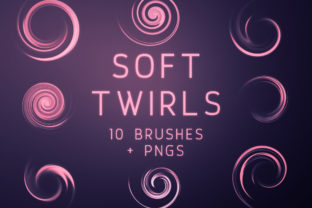
At their core, the Soft Twirls collection is a curated set of digital resources designed for Adobe Photoshop. The package typically includes a zipped folder containing two distinct types of files: 10 Photoshop Brushes (.abr) and 10 corresponding PNG images. But what does this actually mean for the user?
The "twirls" themselves are graphical elements characterized by swirling, organic lines that mimic smoke, ribbon, ink in water, or ethereal light trails. The defining feature of this specific collection is their translucency. Unlike solid shapes that block out what is behind them, these twirls allow the background image, color, or texture to show through. This property is crucial for creating depth and dimension without obscuring the subject of your design.
The inclusion of both brush files and PNGs addresses a common pain point in the design community: accessibility and compatibility. While brushes offer dynamic control within Photoshop, PNGs provide a universal solution for users who may not have the software installed or who prefer a drag-and-drop workflow.
The Power of Translucency in Design
To understand the value of these assets, one must first appreciate the role of transparency in visual composition. In traditional painting, an artist might dilute paint with water or medium to create a glaze, allowing underlying layers to influence the final color. In digital design, translucency serves a similar purpose.
When you apply a translucent twirl over a photograph or a solid color background, it creates a sense of atmosphere. It can soften harsh edges, guide the viewer's eye across the canvas, or add a dreamy, magical quality to the scene. Because these twirls are not opaque, they integrate seamlessly with the existing lighting and color palette of your project, making them look like they belong there rather than appearing as a sticker pasted on top.
Deep Dive: The Photoshop Brushes
The heart of this digital download lies in the 10 custom Photoshop brushes. For those unfamiliar with how digital brushes function, think of them as virtual stamps that react to your mouse or stylus movements. However, these are not simple static stamps; they are engineered for flexibility.
- Scalability: One of the most significant advantages highlighted in this collection is that the brushes are created at a large resolution. In the world of digital assets, size matters. If a brush is created at a small size, stretching it to cover a large area will result in pixelation—a jagged, blurry appearance that ruins professional quality. These large-scale brushes ensure that whether you are designing a tiny social media icon or a massive billboard, you can scale the twirl up or down without losing crispness or detail.
- Dynamic Control: When used in Photoshop, these brushes allow for real-time customization. You can change the color of the twirl instantly to match your brand guidelines. You can adjust the opacity, flow, and blending modes (such as "Screen" or "Overlay") to alter how the twirl interacts with the layer beneath it. This level of control is essential for iterative design processes where tweaks are frequent.
- Variety: With 10 distinct brushes, the set offers a range of swirl patterns. Some may be tight and energetic, while others are loose and flowing. This variety prevents repetition in your designs, ensuring that each project has a unique fingerprint.
The Versatility of Included PNGs
Not every creator uses Adobe Photoshop, and sometimes, speed is of the essence. This is where the 10 included PNG files become invaluable. PNG (Portable Network Graphics) is a file format that supports lossless compression and, crucially, transparency.
These PNGs are essentially pre-rendered versions of the brushes. They are perfect for users who:
- Do not want to install brushes: Installing brushes requires navigating software menus and managing file folders. For a quick edit, dragging and dropping a PNG is significantly faster.
- Use different software: Whether you are using Canva, Procreate, GIMP, or even Microsoft PowerPoint, PNGs are universally compatible. You can import these twirls into almost any design platform that supports layers.
- Need consistency: If you need the exact same swirl shape in multiple places without the variation that comes from hand-painting with a brush, the PNG ensures a identical replica every time.
It is a common misunderstanding that high-quality effects require complex software. This dual-format approach democratizes design, allowing beginners to achieve professional results with simple tools while giving experts the raw materials they need for advanced manipulation.
Practical Applications in Modern Workflows
How do these soft twirls fit into the broader context of modern life, business, and creativity? The applications are surprisingly diverse.
Branding and Marketing
In the competitive landscape of digital marketing, standing out is vital. Businesses often use these translucent elements to create sophisticated backgrounds for websites, brochures, and social media posts. A subtle twirl can add a touch of elegance to a luxury brand or a sense of motion to a tech startup's advertisement. Because they are scalable, they adapt perfectly to both mobile screens and desktop monitors.
Photography and Portraiture
Photographers frequently use overlay textures to enhance mood. A portrait session with a whimsical or romantic theme can be elevated by adding soft, swirling light effects in post-production. Instead of relying on expensive physical props during the shoot, photographers can add these elements digitally, giving them total control over the final look.
Educational and Presentation Materials
Even in education and corporate presentations, visual engagement is key. Teachers and speakers can use these PNGs to break up text-heavy slides, creating visual pathways that guide the audience's attention. The non-distracting nature of translucent graphics makes them ideal for this purpose—they add interest without cluttering the message.
Print Products
While often associated with digital screens, these assets are equally effective in print. From wedding invitations to packaging design, the high-resolution nature of the brushes and PNGs ensures they print sharply. The organic shapes of the twirls can soften the rigid geometry of layout grids, creating a more inviting tactile experience for the consumer.
Clarifying Common Misconceptions
There are a few assumptions potential users often make about digital brushes that warrant clarification.
Misconception 1: "Brushes are only for illustrators."
In reality, brushes are powerful tools for photographers, web designers, and marketers. You don't need to know how to draw to use them; you simply need to know where to click to add flair to an existing image.
Misconception 2: "PNGs are lower quality than brushes."
While brushes offer more dynamic control, a high-resolution PNG retains all the visual fidelity of the original brush stroke. For many static applications, the PNG is actually the superior choice due to its ease of use and compatibility.
Misconception 3: "Translucent means faint or invisible."
Translucency refers to the ability to see through the object, not its visibility. By stacking multiple layers of these twirls or adjusting blending modes, you can create bold, vibrant effects that are fully visible yet integrated with the background.
Conclusion: Elevating Your Creative Toolkit
The Soft Twirls Photoshop Brushes and PNGs collection represents more than just a set of files; it is a gateway to enhanced creativity. By providing both the dynamic flexibility of brushes and the universal convenience of PNGs, this digital download caters to a wide spectrum of creators. Whether you are looking to add a subtle touch of elegance to a corporate report or create a fantastical world for a digital illustration, these translucent twirls offer the versatility and quality needed to succeed.
In an era where visual content dominates communication, having reliable, high-quality assets in your toolkit is essential. Understanding how to leverage these tools allows you to work smarter, not harder, producing professional-grade results that resonate with audiences across digital and printed mediums. Embrace the flow, experiment with transparency, and let these soft twirls add a new dimension to your artistic expression.