Unlocking Digital Nostalgia: A Comprehensive Guide to Vintage Paper Photoshop Brushes
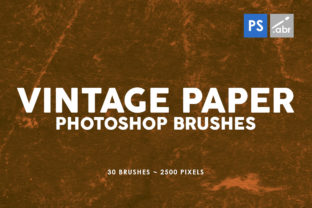
In the rapidly evolving landscape of digital design, there is a persistent and growing desire to reconnect with the tactile warmth of the physical world. While modern software offers pristine clarity and infinite scalability, these very qualities can sometimes result in work that feels sterile or overly polished. This is where the concept of vintage paper textures becomes indispensable. Specifically, collections like the 30 Vintage Paper Photoshop Brushes 2 and the accompanying set of 30 Old Paper Brushes serve as a bridge between the analog past and the digital present. These tools are not merely decorative; they are fundamental elements for designers seeking to infuse authenticity, depth, and character into their projects.
Understanding the Essence of Digital Texture
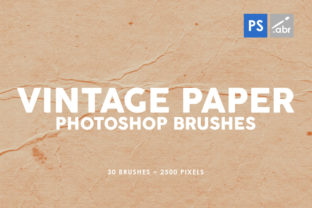
To truly appreciate the value of high-resolution brush sets, one must first understand what they represent in the context of digital art. A digital image, by default, exists on a perfect grid of pixels. It has no grain, no imperfections, and no history. When we speak of "old paper" or "vintage texture," we are referring to the simulation of physical materials that have been subjected to time, light, and handling. These materials possess unique characteristics: fibers, stains, tears, creases, and varying degrees of opacity.
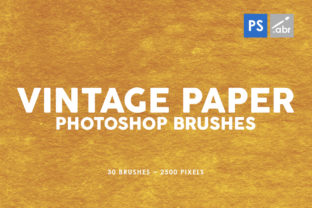
The 30 Vintage Paper Photoshop Brushes 2 collection captures these nuances with remarkable fidelity. With a resolution of 2500 pixels, these brushes provide enough detail to remain crisp even when applied to large canvases or high-definition displays. This high resolution is critical; low-quality textures often appear pixelated or blurry when scaled, breaking the illusion of reality. By utilizing brushes of this caliber, artists ensure that the final output maintains a professional standard regardless of the medium.
The Technical Advantage of Brush-Based Texturing
One might ask why a designer would choose brushes over simply importing a static JPEG texture. The answer lies in flexibility and control. Static images are rigid; once placed, they cover the entire layer uniformly unless masked manually. Brushes, however, allow for painting the texture exactly where it is needed. You can build up layers of grunge in the corners, add subtle fiber details to a specific object, or create a worn edge effect with a single stroke.
Furthermore, these brush sets are designed to be universally compatible, working with any Photoshop version. Whether you are using the latest Creative Cloud subscription or an older, standalone version of the software, the functionality remains intact. This accessibility ensures that students, hobbyists, and professional agencies alike can leverage these tools without worrying about software compatibility issues. The ease of installation and immediate usability makes them a practical addition to any creative workflow.
Practical Applications in Modern Design
The utility of vintage paper brushes extends far beyond simple aesthetic enhancement. They solve specific visual problems and open up new creative avenues across various industries. Let us explore how these tools fit into modern life, work, and creativity.
Photo Overlays and Digital Manipulation
In the realm of photography and photo manipulation, the goal is often to tell a story. A clean, digital photograph might look technically perfect, but it may lack emotional resonance. By applying old paper brushes as overlays, a photographer can transform a modern portrait into something that looks like a discovered artifact from the early 20th century. This technique is particularly effective in:
- Historical Projects: Creating marketing materials for museums, historical documentaries, or period-piece films where authenticity is paramount.
- Portraiture: Adding a soft, organic feel to skin tones and backgrounds, reducing the "plastic" look often associated with heavy digital retouching.
- Surreal Art: Blending multiple images together. The texture acts as a unifying element, making disparate photos look like they belong to the same physical space.
When used as photo overlays, the blending modes in Photoshop (such as Multiply, Overlay, or Soft Light) interact with the underlying image to create complex, natural-looking results. The 2500-pixel size ensures that even fine details like paper grain interact realistically with the light and shadow of the photograph.
Visual Effects for Games and Concept Art
The gaming industry relies heavily on atmosphere. Indie game developers, in particular, often seek art styles that stand out from the hyper-realistic graphics of AAA titles. Vintage paper textures are a cornerstone of many successful indie games that utilize a hand-drawn or "storybook" aesthetic. Artists use these brushes to texture environments, characters, and user interface elements.
For example, a fantasy role-playing game might use these brushes to create the appearance of an ancient map or a spellbook within the game's inventory system. The 30 Old Paper Brushes provide a variety of stains and wear patterns that suggest age and usage, helping to build the game's lore without a single word of dialogue. In concept art, these tools allow artists to quickly iterate on ideas, adding mood and lighting effects that mimic traditional media like watercolor or ink on rough paper.
Decorative Elements in Branding and Web Design
In the corporate and commercial sector, there is a trend known as "retro-modernism." Brands are increasingly moving away from flat, minimalist designs toward identities that feel crafted and human. Vintage paper brushes play a significant role here. They can be used to create:
- Unique Logos: Adding a distressed edge to a logo mark to suggest heritage and longevity.
- Packaging Design: Simulating the look of craft paper or aged labels for artisanal products like coffee, beer, or handmade soaps.
- Web Backgrounds: Subtly texturing a website background to reduce eye strain and add warmth, making the digital experience feel more inviting.
This approach helps businesses differentiate themselves in a crowded marketplace. A brand that feels "handmade" often communicates values of quality, care, and authenticity to the consumer.
Clarifying Common Misunderstandings
Despite their popularity, there are several misconceptions regarding the use of texture brushes that warrant clarification. Understanding these nuances can help beginners avoid common pitfalls and help experienced users refine their techniques.
Misconception 1: More Texture is Always Better.
A frequent mistake among novices is the overuse of texture. Applying a heavy grunge brush at 100% opacity across an entire project can make the design look dirty or unreadable. The key to mastering the 30 Vintage Paper Photoshop Brushes 2 is subtlety. Often, reducing the opacity to 10-30% and using the texture sparingly yields the most professional results. The texture should support the content, not overpower it.
Misconception 2: High Resolution Means Large File Sizes Only.
While it is true that 2500-pixel brushes require more processing power than low-res alternatives, modern computers handle them with ease. The trade-off is entirely worth it for the quality gained. Furthermore, because these are brushes and not massive tiled backgrounds, they do not necessarily bloat your file size if used on separate layers with masks. The benefit of having crisp edges and detailed grain far outweighs the negligible performance cost.
Misconception 3: These Are Only for "Old" Styles.
While labeled as "vintage" or "old," these textures are versatile. They can be color-shifted, inverted, or combined with vibrant neon colors to create a striking juxtaposition known as "glitch art" or "cyber-grunge." The physical properties of the paper (the tooth, the fibers) remain relevant even when the color palette is futuristic. Thus, these tools are not limited to historical recreations; they are fundamental building blocks for any style requiring organic complexity.
Building a Broader Creative Toolkit
Incorporating the 30 Old Paper Brushes and the second volume of vintage sets into your workflow is more than just downloading a new plugin; it is an expansion of your visual vocabulary. It encourages a mindset that values imperfection and history. In education, these tools can teach students about the materiality of design, helping them understand how light interacts with surface irregularities. For professionals, they offer a shortcut to achieving complex looks that would otherwise take hours to paint manually.
The significance of these brushes also touches on the psychological aspect of design. Humans are naturally drawn to patterns and textures found in nature. Smooth, featureless surfaces can feel cold and alienating. By reintroducing the chaos and order of natural paper fibers into our digital creations, we make our work more relatable and emotionally engaging. Whether you are designing a wedding invitation, a movie poster, or a mobile game interface, the addition of a subtle paper grain can be the difference between a design that is seen and a design that is felt.
Conclusion: The Timeless Value of Analog Simulation
As technology continues to advance, the line between the digital and the physical will likely blur even further. However, the appreciation for the tangible qualities of the past remains constant. The 30 Vintage Paper Photoshop Brushes 2 and the companion set of old paper brushes offer a powerful, accessible, and high-quality method to harness this appreciation. With their 2500 pixels of resolution and universal compatibility, they stand as essential tools for anyone looking to elevate their digital art.
By understanding their purpose, exploring their diverse applications, and avoiding common misuse, creators can unlock the full potential of these assets. They remind us that even in a world of perfect pixels, there is profound beauty in the worn, the aged, and the authentically imperfect. Whether for a beginner taking their first steps in Photoshop or a veteran artist seeking new inspiration, these brushes provide the texture necessary to bring stories to life.