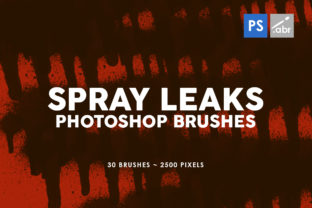
30 Spray Leaks Photoshop Stamp Brushes for Design
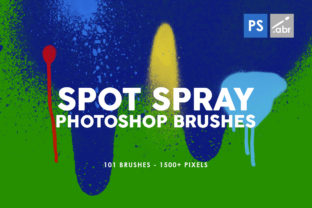
Adding texture and grit to digital designs can often feel like a missing piece of the puzzle, especially when working with clean, vector-based tools. This is where the 30 Spray Leaks Photoshop Stamp Brushes collection becomes an invaluable asset for creators at any skill level. Whether you are a seasoned graphic designer looking to speed up your workflow or a hobbyist experimenting with photo manipulation for the first time, these tools offer a straightforward way to introduce organic, realistic imperfections into your work. The set includes 30 brushes inside, each crafted to mimic the unpredictable nature of spray paint, ink splatters, and liquid leaks, providing a level of detail that is difficult to achieve manually.
The primary appeal of this specific brush pack lies in its versatility and technical quality. Each brush is rendered at a massive 2500 pixels size, ensuring that the textures remain crisp and detailed even when scaled up for large-format prints or high-resolution displays. Unlike lower-quality assets that become pixelated or blurry when enlarged, these high-resolution textures maintain their integrity, allowing you to place them confidently on billboards, posters, or website headers without worrying about visual degradation. Furthermore, the collection is designed to work with any Photoshop version, removing the barrier of entry for users who may not have the latest software update. This compatibility ensures that students, freelancers using older machines, and professionals in varied studio environments can all utilize these resources seamlessly.
Why Texture Matters in Modern Digital Design
In an era where digital perfection is the default, adding a layer of "messiness" can actually make a design feel more human and engaging. The 30 Spray Leaks Photoshop Stamp Brushes address a common problem faced by many creators: the sterile look of flat digital art. By incorporating spray leaks and splatter effects, you can break up solid blocks of color, add depth to backgrounds, and create a sense of movement within a static image. These textures serve as decorative elements that draw the eye and add emotional weight to a composition. For instance, a music festival poster might feel too polished with just clean typography; adding a few strategic spray leaks can instantly give it an edgy, underground vibe that resonates better with the target audience.
The value of this set extends beyond just aesthetics; it is also a significant time-saver. Creating realistic fluid dynamics and spray patterns from scratch using standard painting tools can take hours of trial and error. With these stamp brushes, what used to be a complex process becomes a single click. You simply select the brush, adjust the size and opacity, and stamp the texture onto your canvas. This efficiency allows entrepreneurs and small business owners who manage their own marketing materials to produce professional-looking graphics quickly, without needing to hire a dedicated illustrator for every project.
Practical Applications Across Different Projects
The utility of these brushes spans a wide range of contexts, making them a great addition to any project regardless of the industry. For social media managers and content creators, these textures are perfect for creating eye-catching story backgrounds or post overlays that stand out in a crowded feed. A fitness coach could use a subtle sweat or spray texture behind a motivational quote to convey intensity, while a fashion blogger might use ink leaks to frame a new outfit photo for a grunge-inspired look. Because the brushes are high resolution, they adapt well to both mobile screens and desktop viewing experiences.
In the realm of print templates, the 2500-pixel size ensures that the output remains sharp on physical media. Event planners designing flyers, menus, or invitations can use these spray leaks to add a tactile feel to their paper products. Educators creating engaging presentation slides or workshop handouts can also benefit from these assets. By moving away from generic clip art and using dynamic, organic textures, educational materials become more visually stimulating, helping to retain student attention. Even in commercial advertising, where brand guidelines can be strict, these brushes can be used subtly to add texture to product photography backgrounds, giving the item a more grounded and realistic presence.
Getting Started with Spray Leak Effects
For beginners, the idea of using custom brushes might seem slightly intimidating, but the process is remarkably simple. Once you have installed the 30 Spray Leaks Photoshop Stamp Brushes, they appear in your Brush Tool panel just like any standard tool. To get the best results, start by creating a new layer above your background image. This non-destructive approach allows you to erase or modify the spray effects without damaging the original photo underneath. Experiment with the Opacity and Flow settings in the top toolbar; lowering these values can create a misty, atmospheric effect, while keeping them at 100% delivers bold, impactful splatters.
Consider the color mode of your layers as well. While the brushes come in black by default, you can easily change the color by setting your foreground color before stamping, or by using Layer Blending Modes like Multiply, Screen, or Overlay. Multiplying the spray leak over a light background makes it look like ink soaking into paper, while screening it over a dark background can simulate glowing neon spray or light leaks. This flexibility means the same brush stroke can look completely different depending on how you manipulate it, offering endless creative possibilities for bloggers and marketers looking to establish a unique visual identity.
Important Considerations Before You Begin
While these tools are powerful, there are a few things to keep in mind to ensure you get the most out of them. First, because the brushes are high resolution and large in size (2500 pixels), they can increase your file size significantly if you use many of them on a single document. If you are working on a web project where loading speed is critical, consider rasterizing the layers or reducing the image resolution after applying the effects to optimize performance. Additionally, context is key. Just because you have a cool spray leak brush doesn't mean every design needs one. Overusing textures can make a layout look cluttered and unprofessional. Use these elements intentionally to highlight specific areas or to reinforce a theme, rather than applying them randomly.
It is also worth noting that while the brushes work with any Photoshop version, the interface for managing brushes might look slightly different depending on whether you are using CS6, CC 2020, or the latest 2024 release. However, the core functionality remains the same across all versions. Users should also think about the psychological impact of the textures they choose. Sharp, jagged spray leaks might convey aggression or urgency, suitable for a sale announcement or a rock concert flyer. Softer, mistier leaks might suggest mystery or elegance, fitting for a perfume ad or a novel cover. Understanding the emotional language of these textures will help you apply them more effectively in your personal and professional projects.
Ultimately, the 30 Spray Leaks Photoshop Stamp Brushes collection offers a robust solution for anyone looking to elevate their visual content. By combining ease of use with high-quality, versatile assets, this set empowers users to bridge the gap between digital precision and organic artistry. Whether you are refining a client's brand identity, sprucing up a personal blog, or creating educational materials, these brushes provide the necessary tools to add that final touch of character and style that makes a design truly memorable.