Evaluating the 36 Short Ink Strokes Photoshop Brushes for Digital Art
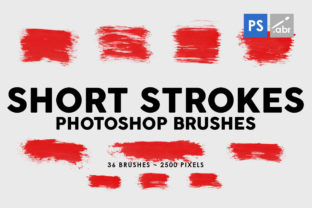
In the realm of digital illustration and photo manipulation, the choice of brush engine and texture can define the aesthetic quality of a project. Artists and designers often seek tools that bridge the gap between traditional media and digital efficiency. The 36 Short Ink Strokes Photoshop Brushes represent a specific category of digital asset designed to replicate the organic feel of hand-painted ink. This collection includes 36 distinct hand-painted ink brushes, each rendered at a high resolution of 2500 pixels. Understanding the capabilities, limitations, and ideal use cases for this toolset is essential for creators deciding whether it aligns with their current workflow and artistic goals.
Understanding the Asset Composition
At its core, this package provides a curated set of 36 unique brush presets. Unlike procedural brushes generated by algorithms, these are derived from actual hand-painted strokes. This origin story is significant because it introduces natural irregularities, varying ink density, and authentic edge textures that are difficult to simulate digitally without extensive customization. The inclusion of "short ink strokes" suggests a focus on sketching, hatching, detailing, and creating textured overlays rather than broad, sweeping washes.
The technical specification of 2500 pixels in size indicates a high-resolution foundation. In digital art, resolution dictates how much a brush stroke can be scaled before pixelation becomes visible. A 2500-pixel source allows for substantial flexibility; users can apply these brushes to large canvases intended for print or downscale them for web graphics without losing the integrity of the ink texture. Furthermore, the compatibility claim—that these brushes work with any Photoshop version—suggests they utilize standard brush engine parameters rather than relying on newer, version-specific features like dynamic shape jitter updates or cloud-linked libraries. This universality is a critical factor for teams working in mixed software environments.
Practical Applications and Use Cases
The versatility of the 36 Short Ink Strokes Photoshop Brushes extends across several disciplines. For digital painters, these brushes serve as an excellent medium for line work and shading. The short nature of the strokes makes them particularly effective for cross-hatching techniques, adding grit to character designs, or simulating the look of comic book inking. Because the textures are high resolution, they hold up well when used as primary drawing tools.
Beyond illustration, these assets function effectively as photo overlays. Photographers and retouchers can use them to add a tactile, analog feel to digital images. By placing an ink stroke layer over a photograph and adjusting the blending mode to "Multiply" or "Overlay," one can introduce shadow elements, frame compositions, or create a collage aesthetic. This is particularly useful in advertising and editorial design where a handmade look is desired to stand out against polished, sterile photography.
In the context of game development and visual effects, these brushes offer a resource for creating UI elements, texture maps, or stylized effects. For instance, a fantasy game interface might utilize these ink strokes for border decorations or skill icons to maintain a consistent hand-drawn theme. Similarly, motion graphic artists can import these static strokes into animation software to create frame-by-frame effects that mimic traditional animation styles.
Benefits of Hand-Painted Textures
The primary advantage of utilizing hand-painted brushes over synthetic ones is the inherent unpredictability and organic quality. Digital perfection can sometimes result in artwork that feels cold or repetitive. The 36 Short Ink Strokes Photoshop Brushes introduce human error and variation into the digital pipeline. Each stroke carries the nuance of the physical brush pressure and the absorption of ink into paper, providing a depth that enhances visual interest.
Another benefit is workflow efficiency. Creating custom brushes from scratch requires time, scanning equipment, and processing skills. Having a pre-made library of 36 high-quality options allows artists to bypass the setup phase and move directly into creation. The high resolution ensures that these brushes are future-proof; they will not become obsolete if a user upgrades their monitor resolution or shifts to larger format printing.
Considerations and Tradeoffs
While the benefits are clear, there are tradeoffs to consider. The specificity of "short ink strokes" means this pack may not be a comprehensive solution for every painting need. Artists requiring long, flowing calligraphic lines or broad watercolor washes may find the stroke length limiting. In such scenarios, this pack would serve best as a supplementary tool rather than a primary brush set.
Additionally, while the brushes work with any Photoshop version, the performance of high-resolution brushes can vary depending on the computer's hardware. Applying a 2500-pixel textured brush repeatedly on a massive canvas may tax older systems or those with limited RAM. Users should be prepared to manage their history states and layer counts to maintain smooth performance.
There is also the consideration of style fit. Hand-painted ink has a distinct aesthetic—gritty, expressive, and somewhat rough. Projects requiring clean, vector-like precision or hyper-realistic rendering may find these textures too intrusive. It is vital to evaluate whether the "ink" look complements the overall direction of the project before integration.
Decision-Making Insights
When evaluating whether to incorporate the 36 Short Ink Strokes Photoshop Brushes into your toolkit, consider your current project requirements. If you are working on a project that demands an organic, illustrative, or vintage feel, these brushes are a strong fit. They are particularly valuable for concept artists, comic illustrators, and graphic designers looking to add texture without resorting to stock photos.
However, if your workflow relies heavily on smooth gradients, 3D rendering integration, or minimalist flat design, alternatives such as soft airbrushes or geometric shape tools might be more appropriate. It is also worth noting that while this pack offers 36 variations, professional workflows often require hundreds of brushes. Therefore, viewing this set as a specialized addition to a broader library is a pragmatic approach.
Ultimately, the value of these brushes lies in their ability to inject humanity into digital work. The high resolution ensures longevity, and the universal compatibility guarantees accessibility. For creators seeking to enhance their digital photo manipulation, game assets, or artwork with authentic ink textures, this collection offers a reliable and efficient solution. By understanding both the strengths of the hand-painted texture and the limitations of the specific stroke style, users can make an informed decision that elevates the quality of their visual output.